Review Process
After creating a campaign and submitting creatives, your content undergoes a review process. During this time, our review team examines each creative to ensure compliance with advertising policies and that all links function correctly.
Review Timeline
- Standard review: Up to 24 hours
- Weekends/Holidays: May take slightly longer
- Re-submissions: Reviewed in the order received
Once approved, your creative will begin running according to the start date you specified.
Review Statuses
| Status | Description |
|---|---|
| Draft | Not yet submitted for review |
| Pending | Currently under review |
| Active | Approved and running |
| Paused | Approved but temporarily paused |
| Rejected | Did not pass review |
| Archived | Removed from active use |
Review the full list of Creative Statuses.
What We Review
Our team evaluates every creative across multiple dimensions:
Images
- Resolution and quality
- Appropriateness of content
- Relevance to the offer
Copy
- Grammar and spelling
- Accuracy of claims
- Appropriateness of language
Links
- URL functionality
- Landing page quality
- Content consistency
Buttons
- Appropriate text
- Grammar correctness
Rejection Reasons
If your creative is rejected, you'll see specific feedback explaining why. Common rejection reasons include:
Image Rejection Reasons
| Reason | Description |
|---|---|
| Low resolution or poor quality | Image is blurry, pixelated, or visually unappealing |
| Inappropriate, offensive, or sexual | Content violates our advertising policies |
Icon Rejection Reasons
| Reason | Description |
|---|---|
| Low resolution or poor quality | Icon is unclear or poorly designed |
| Inappropriate, offensive, or sexual | Icon contains policy-violating content |
Title Rejection Reasons
| Reason | Description |
|---|---|
| Inappropriate, offensive, or sexual | Language violates policies |
| Grammar issues | Spelling or grammatical errors |
| Makes an exaggerated claim | Unsubstantiated or misleading claims |
Message Rejection Reasons
| Reason | Description |
|---|---|
| Inappropriate, offensive, or sexual | Content violates policies |
| Grammar issues | Spelling or grammatical errors |
Button Rejection Reasons
| Reason | Description |
|---|---|
| Inappropriate, offensive, or sexual | Button text violates policies |
| Grammar issues | Spelling or grammatical errors |
Link Rejection Reasons
| Reason | Description |
|---|---|
| Contains inappropriate content | Landing page has policy-violating content |
| Broken URL | Link doesn't work or returns an error |
| Poor landing page quality | Page has non-functional, low-quality, or disruptive elements |
Other Rejection Reasons
| Reason | Description |
|---|---|
| Excessive creatives | More creatives than recommended for optimal performance |
| Below platform standards | Creative doesn't meet overall quality standards |
Handling Rejections
When your creative is rejected:
- Review the feedback - Check the rejection reason in your Campaign Dashboard and Creative tab
- Understand the issue - Each rejection includes specific guidance
- Make corrections - Edit your creative to address the issues
- Resubmit - Submit your corrected creative for another review
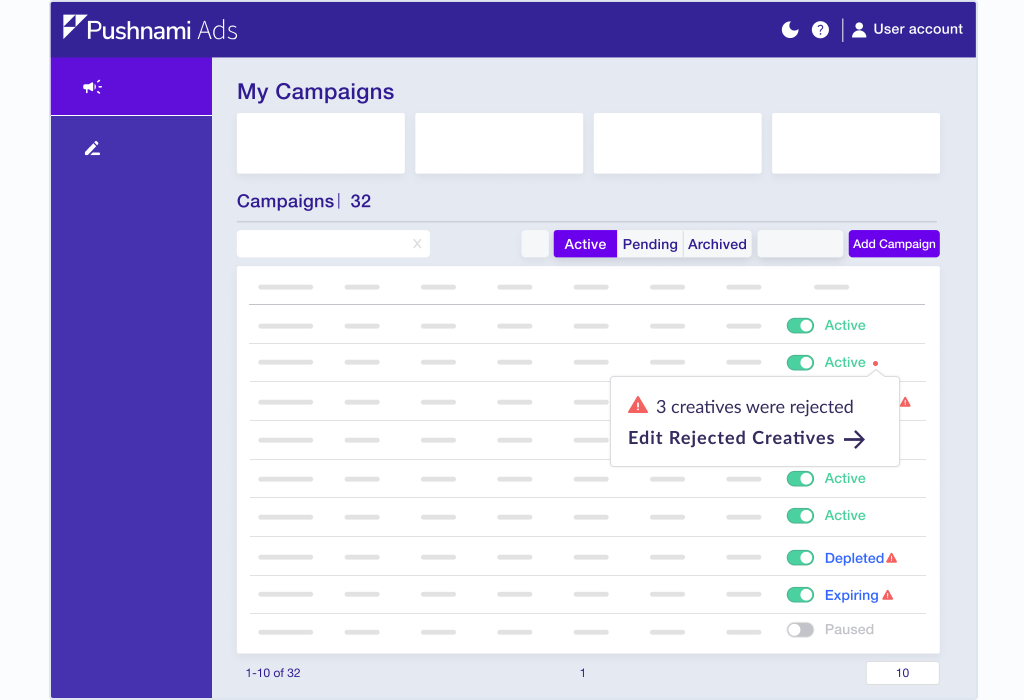
Rejection Alerts
Rejected creatives trigger alerts in multiple places:
- Campaign Dashboard (red indicator)
- Creative tab of the campaign
- Email notification (if enabled)
Browser Compliance Guidelines
Modern browsers like Chrome have implemented spam detection algorithms that can affect push notification delivery. Pushnami proactively filters creatives to protect your subscriber reach and ensure compliance.
Emojis to Avoid
Certain emojis correlate with higher spam scoring. Avoid using:
| Emoji | Reason |
|---|---|
| 🎉 🎊 | Associated with prize/giveaway spam |
| 💵 💰 💸 | Financial/money-related spam triggers |
| 🎰 🎲 | Gambling associations |
| 👏 🙌 | Commonly used in spam patterns |
| ⏳ ⏰ | False urgency indicators |
| 🚨 ⚠️ | Fake alert/warning spam |
Keywords to Avoid
These words and phrases may trigger spam filters:
High Risk:
- "Alert", "Warning", "Security"
- "Free", "Prize", "Winner"
- "Cash", "Money", "Claim"
- "Virus", "Infected", "Compromised"
Moderate Risk:
- "Urgent", "Act now", "Limited time"
- "Congratulations", "You've won"
- "Click here immediately"
- "Don't miss out"
Language Patterns to Avoid
- False urgency: "You must act NOW!" or "Expires in 5 minutes!"
- Misleading claims: Implying the user has won something or has a pending reward
- System impersonation: Making notifications look like system alerts or warnings
- Deceptive framing: Suggesting something is "waiting" or needs to be "claimed"
What Pushnami Does
Pushnami has developed internal detection methods to identify content that may trigger browser spam thresholds:
- Automatic filtering - Creatives with high-risk elements are flagged during review
- Proactive protection - Content that could affect your subscriber list is blocked
- Ongoing analysis - We continuously update our detection as browser policies evolve
Write notifications as if you're communicating with a valued customer. Clear, honest messaging that provides genuine value will always perform better than tactics designed to trick users into clicking.
Tips for Approval
Images
- Use high-resolution images (720×480 for hero, 192×192 for icon)
- Ensure images are relevant to your offer
- Avoid text-heavy images
- Use professional, appropriate imagery
Copy
- Proofread for grammar and spelling
- Make accurate, substantiated claims
- Keep messaging clear and honest
- Avoid misleading language
- Review the Browser Compliance Guidelines above
Links
- Test your links before submitting
- Ensure landing pages load quickly
- Match landing page content to notification promises
- Avoid aggressive pop-ups or redirects
General
- Follow best practices for images and copy
- Review our advertising policies
- Keep content professional and appropriate
- Ensure consistency between notification and landing page
Re-Review Process
Edited creatives require re-review. When you modify an approved creative:
- The creative status changes to Pending
- The creative stops running during review
- Once re-approved, it resumes running
To avoid downtime, consider cloning a creative, making changes to the clone, and having both versions ready.
Expedited Review
For time-sensitive campaigns, contact your Pushnami account representative to discuss expedited review options.
Questions?
If you believe your creative was rejected in error or need clarification on rejection reasons, contact support@pushnami.com.